We may earn a commission when you buy through links on this page, at no extra cost to you. How this works.
Screens emit concentrated blue wavelengths that signal your brain to stay alert - helpful at noon, problematic at midnight. When blue light reaches the retina after sunset, it suppresses melatonin production and delays the natural circadian shift toward sleep readiness. For anyone tackling late-night analysis, writing, or problem-solving, that interference compounds: you stay wired longer, fall asleep later, and wake feeling less restored.
Beyond sleep, sustained exposure contributes to digital eye strain. Symptoms include dry eyes, difficulty focusing, and a sensation of heaviness behind the eyelids - all friction when concentration matters most. Blue light blocking screen protectors filter the shorter wavelengths before they reach your eyes, reducing both the circadian disruption and the cumulative fatigue that builds during extended sessions.
Choosing the right protector requires balancing four priorities. Blocking efficiency determines how much blue light the film removes, typically measured as a percentage in the 380 - 500 nm range. Visual clarity ensures text remains sharp and colors stay accurate enough for detailed work; aggressive tints can muddy contrast or shift hues. Ease of installation affects whether you get a bubble-free fit on the first attempt, and device compatibility confirms the protector matches your monitor size or tablet model exactly. Durability - scratch resistance, adhesive longevity, and cleanability - decides whether the investment lasts six months or two years.
The recommendations below compare protectors across these criteria using verified specifications and real-world tradeoffs. Each option suits a different combination of screen size, work style, and tolerance for color shift, so you can match the filter to your specific late-night routine without guessing.
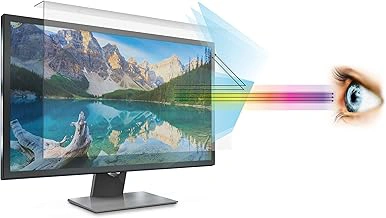
Anti Blue Light Screen Filter for 21-22 Inch Widescreen Desktop Monitors
Standard office monitors between 21 and the listed size get reliable blue light filtration with this widescreen-compatible filter. The film installs directly over the display surface and maintains a balance between color fidelity and spectrum reduction, making it practical for text documents, spreadsheets, and code editors where line clarity matters more than saturated visuals.
The attachment method uses adhesive corner tabs or hanging clips, both included, so you can secure the filter without permanent adhesive or frame hardware. This approach works well in dual-monitor arrangements where you want symmetry and quick removal if you switch between filtered and unfiltered displays during color-critical tasks.
At $39.99 with a 4.4 out of 5 rating, the filter delivers consistent performance for late-evening cognitive work sessions. The material blocks a portion of the blue spectrum without introducing the heavy amber cast that can distort syntax highlighting or cell formatting cues. You'll notice reduced glare from overhead lighting and less eye fatigue during extended focus periods, though the filter does dim overall Anti Blue Light Screen Filter for 21-22 Inch Widescreen Desktop Monitors by a small margin.
This size range fits most standard desktop setups, and the universal widescreen ratio accommodates common multiple:multiple and multiple:9 aspect ratios. If your workflow involves frequent monitor adjustments or standing desk transitions, the non-permanent attachment makes repositioning straightforward without leaving residue.
Best suited for users who prioritize reading comfort and stable work environments over high-contrast media viewing, this filter supports sustained attention without forcing you to compromise legibility or workspace aesthetics.
- ✅ Fits 21 - 22 inch widescreen monitors with flexible attachment options
- ✅ Balances blue light filtration with color accuracy for text-heavy tasks
- ✅ Non-permanent installation allows easy removal and repositioning
- ✅ Reduces glare and eye strain during extended cognitive work
- ⚠️ Slightly reduces overall screen brightness
- ⚠️ May not suit workflows requiring full color saturation
How We Evaluated Blue Light Screen Protectors
We evaluated each screen protector by examining verified specifications for blue light filtration performance in the 400 - 455 nanometer range, where high-energy visible light is most concentrated during evening screen use. Optical clarity matters for late-night work, so it helps to compare manufacturer-reported light transmittance rates and color distortion levels to identify protectors that maintain neutral color rendering during document editing and data analysis. Installation method - whether magnetic hanging brackets, adhesive film, or static cling - affects both ease of setup and repositioning flexibility across different monitor sizes.
We also considered anti-glare coatings, since reflections from overhead lighting can compound eye strain during extended sessions. Size compatibility tables and user ratings provided insight into real-world fit for common monitor dimensions and tablet models. Because manufacturers use different measurement standards, we focused on products with transparent wavelength filtration data and customer feedback that described actual usability rather than general satisfaction. This approach helps surface protectors that balance meaningful blue light reduction with the color accuracy and clarity cognitive work demands.
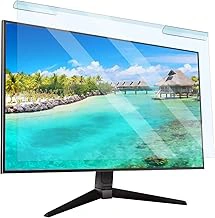
Universal Blue Light Screen Filter for 23-24 Inch Desktop Monitors, Frame Hanging Type
Shared workspaces and alternating work styles often require flexibility in screen filtering. The Universal Blue Light Screen Filter for 23-24 Inch Desktop Monitors uses a frame-hanging design that allows quick attachment and removal without adhesive or permanent mounting. Priced at $32.99, it delivers accessible blue light filtering for standard desktop monitors.
The frame-hanging mechanism rests over the top edge of the monitor, secured by adjustable clips. This approach works well when multiple users share a workstation or when you prefer unfiltered color work during daytime hours and activate filtering only for late-night sessions. Removal takes seconds, and the filter stores flat when not in use.
Designed to fit 23- to 24-inch monitors, the filter hangs slightly forward from the screen surface, creating a small gap. This standoff distance helps reduce the chance of direct contact but adds modest depth to the monitor footprint. For desks with limited clearance or mounted displays, measure the available space before installation.
The lower price reflects a simpler construction compared to adhesive or magnetic models. The frame and filter material provide functional blue light reduction, though the hanging design may introduce minor glare under certain lighting angles. Positioning desk lamps to avoid direct reflections mitigates this tradeoff.
User ratings average 4.4 out of 5, with feedback highlighting the ease of switching between filtered and standard viewing. This filter suits budget-conscious setups, temporary workstations, or environments where permanent modification isn't practical. If you value installation flexibility and cost savings over a flush fit, the frame-hanging approach offers a straightforward solution for late-night cognitive work.
- ✅ Affordable at $32.99 for standard monitor sizes
- ✅ Frame-hanging design allows quick installation and removal
- ✅ Works well for shared workspaces or alternating use
- ✅ No adhesive or permanent mounting required
- ⚠️ Hangs forward from screen, adding depth to monitor footprint
- ⚠️ May introduce minor glare depending on lighting angles
- ⚠️ Simpler construction compared to adhesive or magnetic options
What to Look for in a Blue Light Blocking Screen Protector
Choosing a screen protector that blocks blue light without disrupting your work requires balancing filtration strength, visual quality, and practical fit. Start by checking the wavelength range the protector filters - most target 380 - 450 nm, the part of the spectrum linked to circadian rhythm disruption. Products that block closer to 50% of blue light typically introduce a warmer, amber tint, while those filtering 30 - 40% maintain more neutral color balance. If your work involves design, photo editing, or data visualization with color-coded charts, prioritize optical clarity and test whether the tint interferes with accurate color perception during late-night sessions.
Installation type matters for flexibility and device compatibility. Adhesive films stick directly to the screen and work well with touch screens and stylus input, but they require careful alignment and can leave residue if removed. Hanging protectors attach via tabs or clips at the top of the monitor and offer easier repositioning, though they may shift slightly and aren't suitable for tablets. Magnetic mounts use frame-mounted strips for quick on-off use, helpful if you switch between color-critical tasks and extended reading or coding work. Measure your screen's active display area - not the bezel - and confirm the protector's dimensions match, especially for ultrawide or non-standard aspect ratios.
Anti-glare and anti-reflective coatings address different problems. Anti-glare surfaces diffuse overhead lighting and reduce harsh reflections but can soften text sharpness slightly, which may feel fatiguing during long reading or coding sessions. Anti-reflective coatings preserve sharper text by minimizing mirror-like reflections without scattering light. If your workspace has strong ceiling lights or windows behind you, anti-glare may provide more immediate comfort. For dim environments where screen clarity is the priority, anti-reflective treatments keep text crisp. Touch screen users should verify that the protector supports capacitive input without added pressure or lag, and stylus users should confirm compatibility with active pen technology to avoid skipped strokes or reduced palm rejection.
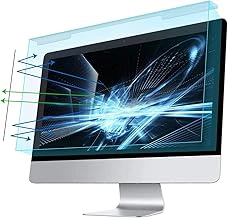
MOSISO 20-22 Inch Blue Light Blocking Screen Protector for Widescreen Desktop Monitors
Users working with multiple windows or split-screen setups late at night will appreciate the MOSISO 20-22 Inch Blue Light Blocking Screen Protector's coverage for widescreen desktop monitors. The protector fits displays between 20 and the listed size and includes anti-glare properties that help reduce reflections from overhead lighting or desk lamps during extended sessions. With a 4.4 out of 5 rating and a price of $37.99, this option balances functionality with accessibility for home office environments where screen real estate matters.
The protector mounts to the edges of widescreen monitors, staying in place without adhesive that could leave residue or interfere with display quality. For cognitive work involving spreadsheets, research documents, or code editors arranged side by side, the anti-glare coating helps maintain visibility across the full width of the screen without washing out detail in bright areas. The blue light filtering layer works to reduce the shorter wavelengths emitted by LED MOSISO 20-22 Inch Blue Light Blocking Screen Protector for Widescreen Desktop Monitors, which can be especially noticeable during late-night sessions when contrast sensitivity shifts. Build durability supports regular repositioning if you switch between monitor orientations or workstations, though the protector works best when left in a fixed setup to maintain consistent edge alignment.
- ✅ Compatible with 20-22 inch widescreen desktop monitors
- ✅ Anti-glare coating reduces reflections from ambient lighting
- ✅ Edge-mount design avoids adhesive residue on the display
- ✅ Supports multi-window and split-screen workflows
- ⚠️ Requires careful alignment for proper edge fit
- ⚠️ Best suited for fixed monitor setups rather than frequent repositioning
Quick Checklist: Choosing Your Screen Protector
- Measure your monitor or tablet diagonally to confirm size compatibility
- Check whether your workflow requires color-accurate rendering or if a warm tint is acceptable
- Decide between removable frame-hanging filters and semi-permanent adhesive types
- Verify tempered glass thickness if using a stylus or screen tap gestures
- Consider purchasing two filters if you alternate between devices or want a backup
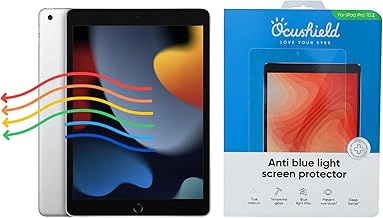
Ocushield Anti Blue Light Tempered Glass Screen Protector for Apple iPad 10.2" (7th/8th/9th Gen)
Professionals who review contracts, annotate research papers, or read reports on an iPad after hours face a familiar tradeoff: tablet portability meets late-night blue light exposure. The Ocushield Anti Blue Light Tempered Glass Screen Protector for Apple iPad 10.2" (7th/8th/9th Gen) addresses this with a precisely fitted tempered glass layer designed to filter high-energy visible light without compromising touch responsiveness.
This protector fits the 10.2-inch iPad used across three generations, making it a stable choice if your workflow centers on that specific model. Tempered glass construction adds scratch resistance and impact protection beyond what film alternatives offer, useful when the device travels between desk, couch, and nightstand. Ocushield's filtration approach maintains color accuracy better than heavily tinted screens, so graphs, charts, and color-coded documents remain legible during extended reading sessions.
At $38.25, this sits at the premium end of tablet screen protection. The 4.2 out of 5 rating reflects solid performance, though some users note installation requires careful alignment to avoid dust or bubbles along the edges. Touch sensitivity remains consistent after application, and the oleophobic coating resists fingerprint smudges during stylus or finger-based annotation work.
The rigid glass format suits users prioritizing durability and a glass-like feel over flexibility. If your iPad doubles as a bedtime reading device or late-shift content review tool, the combination of blue light filtering and physical screen protection justifies the higher cost compared to disposable film options.
- ✅ Tempered glass durability with scratch and impact resistance
- ✅ Precise fit for iPad 10.2" across 7th, 8th, and 9th generations
- ✅ Maintains color accuracy for document review and content work
- ✅ Oleophobic coating reduces fingerprint visibility
- ⚠️ $38.25 price point higher than film-based protectors
- ⚠️ Installation requires careful alignment to avoid edge bubbles
How Blue Light Filtration Fits Into a Broader Sleep Hygiene Strategy
Screen protectors that filter blue light work best when paired with other habits that support your natural sleep-wake cycle. Software tools like f.lux or Night Shift adjust screen color temperature throughout the evening, reducing short-wavelength light without adding a physical layer. A screen protector adds a fixed level of filtration that stays consistent regardless of software settings, which can be useful if you switch between devices or work in environments where you cannot control display settings.
Room lighting also plays a role. Overhead LED or fluorescent lights emit significant blue wavelengths, so dimming overhead fixtures or switching to warmer bulbs after sunset reduces overall exposure. A desk lamp with adjustable color temperature gives you localized control without flooding the room with cool-toned light. Combining ambient light changes with a filtered screen creates a more complete reduction in stimulating wavelengths during the hours before sleep.
Work-rest this product matter just as much as the tools you use. Finishing cognitively demanding tasks at least one hour before bed allows your brain to shift out of high-alert mode, even if screens are involved in that final hour for lighter activities like reading or planning. Blue light filtration does not override the arousing effect of engaging content or work stress, so the type of task and your emotional state influence sleep readiness more than light spectrum alone.
Circadian rhythm optimization involves consistent wake and sleep times, morning light exposure, and minimizing bright light in the late evening. A screen protector that blocks 30 - 50% of blue light supports this pattern but does not replace the anchoring effect of natural daylight early in the day. If your schedule includes night shifts or irregular hours, a screen filter becomes one layer in a strategy that may also include blackout curtains, strategic naps, and careful timing of caffeine.
Screen protectors offer a passive, always-on solution that requires no habit change once installed, which makes them a practical complement to software and lighting adjustments that depend on manual activation or environmental control. The filter is most effective when your other sleep hygiene practices are already in place, rather than serving as a single fix for poor sleep or eye strain caused by excessive screen time or inconsistent routines.
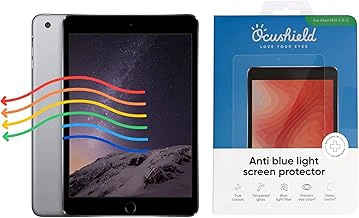
Ocushield Anti Blue Light Tempered Glass Screen Protector for Apple iPad 10.9" (10th Gen)
The Ocushield Anti Blue Light Tempered Glass Screen Protector for Apple iPad 10.9" (10th Gen) offers the same protective technology as other Ocushield models, tailored specifically for the multiple iPad release. Priced at $37.30 and holding a 4.2 out of 5 rating, this version delivers edge-to-edge coverage for the 10th generation iPad without sacrificing touch sensitivity or clarity.
Compatibility matters here: the 10th Gen iPad introduced a redesigned body with a larger display and repositioned front camera, so this protector will not fit earlier multiple" models or the Air series. If you bought your iPad in late multiple or after and see the flat-edge design with USB-C charging, this is the correct fit. The tempered glass construction adds a layer of drop protection alongside blue light filtration, which can be helpful during late-night reading or note-taking sessions when both screen durability and visual comfort are priorities.
Installation requires careful alignment along the top edge to avoid covering the camera or leaving gaps near the borders. Once in place, the glass sits flush and maintains the responsiveness needed for stylus work or gesture navigation. The 4.2 rating reflects mostly positive feedback on fit and clarity, with occasional mentions of minor edge lift if applied on a dusty surface.
Choose this protector if you own the 10th Gen iPad and want proven blue light filtering in a tempered glass format. The price sits slightly lower than some monitor options, and the precise cutouts make it a straightforward upgrade for users who rely on their iPad for extended evening workflows.
- ✅ Designed specifically for iPad 10.9" 10th Gen with precise cutouts
- ✅ Tempered glass adds drop protection alongside blue light filtering
- ✅ Maintains touch and stylus responsiveness
- ✅ Priced at $37.30
- ⚠️ Only fits 10th Gen iPad - not compatible with earlier 10.2" models or iPad Air
- ⚠️ Requires careful alignment during installation to avoid camera obstruction
- ⚠️ Some users report minor edge lift if surface isn't perfectly clean
Final Recommendations: Match Your Screen Protector to Your Work Setup
Choosing the right blue light blocking screen protector comes down to how you work, not just what sounds most impressive on a spec sheet. If you spend late nights across multiple desktop monitors, prioritize a protector that balances strong filtration with accurate color rendering - especially if your tasks involve design review, data visualization, or detailed document editing. A protector that clips or magnets into place will make multi-screen setups easier to manage without adhesive residue or alignment headaches.
Budget-conscious users should focus on core blue light reduction rather than premium coatings or adjustable tint features. The protectors in this guide all deliver meaningful filtration; paying less often means trading convenience features like tool-free installation or anti-glare layers, not protection itself. If your work is text-heavy and color precision matters less, a straightforward adhesive film will serve you well without stretching your budget.
Mobile-first workers benefit most from protectors designed for tablets and laptops, where portability and edge-to-edge coverage matter. Look for options that maintain touch sensitivity and resist fingerprint buildup, since late-night work on a tablet often means more direct interaction with the screen. A protector that adds bulk or dulls responsiveness will become frustrating quickly, no matter how effective the blue light filter.
For those who prioritize color accuracy - photographers editing on the go, designers finalizing mockups, or analysts reviewing charts - choose a protector with a lighter tint and verified color shift data. Stronger filtration often means warmer hues, which can make it harder to trust what you see on screen. All five options in this guide reduce blue light exposure, so the real decision is whether you need maximum filtration or the subtlest possible impact on your display.
Minor differences in blue light percentage blocked or coating hardness are less important than finding a protector that fits your screen size, installs without bubbles, and matches how you actually use your devices. Prioritize fit and installation type, then let your budget and color needs guide the final choice.